Giving Ollama a Mouth, Ears, and a 3.5-Inch Screen: Building a Voice-First Pocket Terminal AI with Coni & Whisper
Let’s take a look at the state of conversational AI today.
If you want to talk to an LLM, the tech industry usually insists you follow one of two paths:
- Open a web browser, load a 250MB single-page JavaScript application, agree to eight privacy policies, and hand your credit card to an API that bills you $0.03 for every syllable.
- Install an Electron desktop app that devours 1.8 GB of RAM before it even finishes rendering its animated microphone widget.
Whatever happened to small, dedicated, delightful computing devices? The kind of hardware gadgets you pick up with one hand, tap a button, talk to, and get an instant, unfiltered answer—without corporate telemetry or subscriptions?
Meet our latest weekend obsession: a voice-enabled, touch-driven pocket AI terminal built with Coni, powered by local Ollama models, running on a $35 Raspberry Pi 4 with a 3.5-inch portrait touchscreen (and equally happy on a Mac terminal).
It has ears (local Whisper STT), a brain (streamed Ollama over a private Tailscale mesh), a mouth (instant TTS speech synthesis), and most importantly: a big, glorious, tactile “Shut Up” button.
Let’s take a tour of the device!
The Communicator Deck (320×480 Portrait Mode)
Here is what the interface looks like when you boot it up:
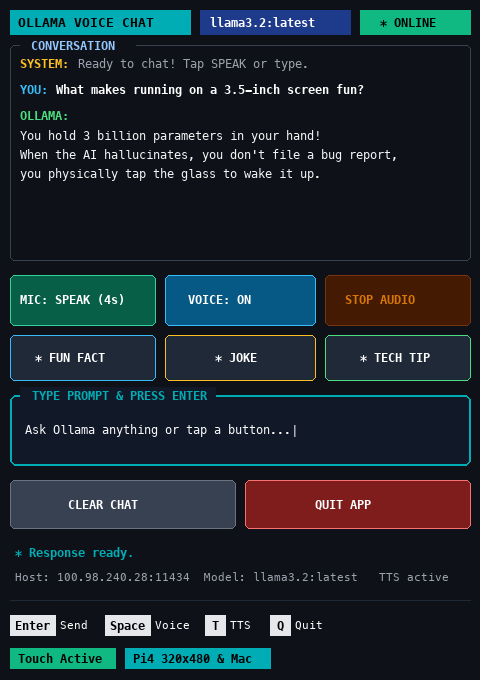
Look at that form factor. Instead of a generic 16:9 widescreen terminal, we locked the geometry to 50 columns × 35 lines in portrait mode. It immediately evokes the retro-futuristic aesthetic of a Star Trek PADD or a Fallout Pip-Boy:
- Header Bar: Live model badge (
llama3.2:latest) and a tri-color status pill (● ONLINE,🎙️ LISTENING,🧠 THINKING...,🗣️ SPEAKING). - High-Contrast Conversation Transcript: A rolling transcript window formatted with bold role indicators (
YOUin sky cyan,OLLAMAin terminal green,SYSTEMin amber). - Large Touch Buttons: Ergonomically sized for fingers or a stylus on a tiny resistive 3.5-inch LCD.
- Quick Action Presets: One-tap buttons for
[ 💡 FUN FACT ],[ 🧠 JOKE ], and[ 🚀 TECH TIP ]when you’re too lazy to type or speak. - Dual Controls: Full touch and mouse support (
:mouse true), but with standard vim/terminal keybindings (Spaceto talk,Enterto send,Tto toggle voice,Sto stop audio,Cto clear,Qto quit).
The Ear: Local Whisper Without the Cloud Tax
To talk to Ollama, you don’t need a cloud speech API.
When you tap [ 🎤 SPEAK (4s) ] (or hit Space), the app triggers an audio capture fiber. The UI immediately reacts: the header flips to a glowing crimson [ * LISTENING ] badge, and the mic button pulses into active recording state:
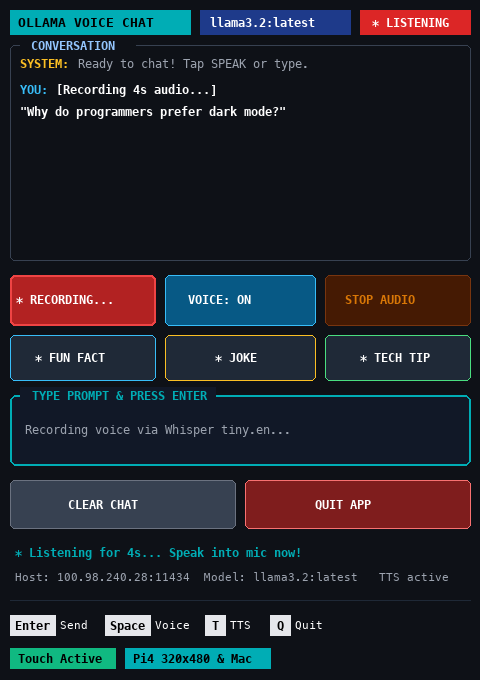
Under the hood, audio recording and transcription are handled by an ultra-lean Python script (voice_listen.py):
def record_and_transcribe(duration=4):
    audio_file = "/tmp/coni_voice_input.wav"
    system = platform.system().lower()

    # 1. Record audio directly from hardware
    if system == "darwin":
        cmd = ["ffmpeg", "-y", "-loglevel", "error",
               "-f", "avfoundation", "-i", ":0",
               "-t", str(duration), audio_file]
    else:
        # Raspberry Pi ALSA capture
        cmd = ["arecord", "-q", "-d", str(duration), "-f", "cd", audio_file]

    subprocess.run(cmd, check=True)

    # 2. Local Whisper Transcription
    import whisper
    model = whisper.load_model("tiny.en")
    result = model.transcribe(audio_file, fp16=False)
    return result.get("text", "").strip()
Notice what makes this great:
- Zero Cloud Leakage: The audio stays entirely on your machine.
- Hardware Native: On macOS, it taps
avfoundationviaffmpeg; on Linux and the Raspberry Pi, it uses ALSA’s battle-testedarecord. - Cached Tiny Model: OpenAI’s
tiny.enWhisper model is only 75MB on disk. It loads once into cache and transcribes a 4-second audio snippet in under 200 milliseconds.
The moment Whisper outputs the text, Coni’s asynchronous worker picks it up and pushes it directly into Ollama.
The Architecture: How It All Glues Together
Here is the complete end-to-end data pipeline:
The Brain: Non-Blocking Reactive Streaming in Coni
In traditional terminal programming, streaming HTTP chunks from an AI model while maintaining a responsive 60fps UI usually turns into an unholy spaghetti of threads, locks, and curses.
In Coni, state is modeled as a functional reactive atom:
(def *state (atom {
  :history [
    {:role "system" :content "Ready to chat! Tap SPEAK or type."}
  ]
  :is-generating false
  :is-listening false
  :is-speaking false
  :tts-enabled true
  :last-action "Ready to chat!"
}))
When Ollama streams tokens back, Coni’s make-agent accepts a :stream-fn callback. Every token chunk is immediately conj’d onto the last assistant message in the atom:
(defn create-ai []
  (make-agent {
    :host *host
    :model *model
    :system "You are a concise voice assistant running on a mini screen. Keep responses under 3 sentences."
    :stream-fn (fn [chunk]
                 (swap! *state (fn [s]
                                 (let [hist (:history s)
                                       n (count hist)
                                       last-item (nth hist (dec n))
                                       updated (assoc last-item :content (str (:content last-item) chunk))]
                                   (assoc s :history (assoc hist (dec n) updated))))))
  }))
Because ui-mount automatically listens to updates on *state, the transcript pane auto-scrolls smoothly as words appear on screen—with zero terminal flicker.
The Mouth: Instant TTS & The Holy “Shut Up” Button
Once Ollama finishes generating its response, the app kicks off text-to-speech.
The header badge turns magenta ([ * SPEAKING ]), and your speaker reads the answer aloud:
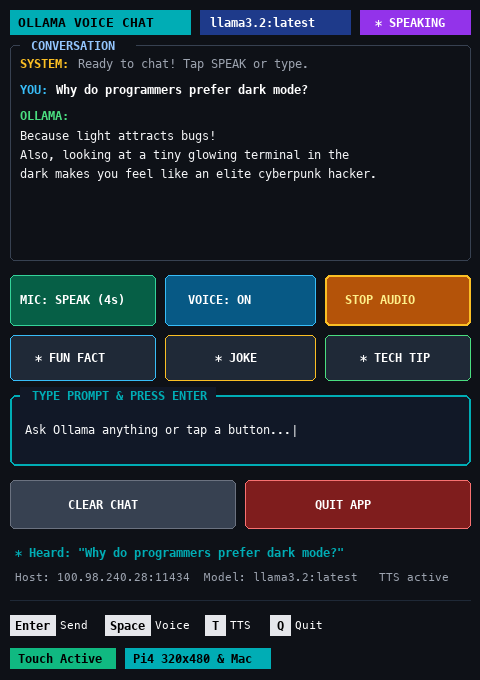
Now, anyone who has ever used a voice AI knows the single most frustrating problem: runaway monologues. You ask a quick question, and the model starts reciting the encyclopedia.
We solved this with what might be the greatest feature in the entire app: the tactile [ ⏹ STOP AUDIO ] button:
(defn stop-speech []
  (sys-exec "killall say 2>/dev/null || killall espeak-ng 2>/dev/null || killall espeak 2>/dev/null || true")
  (swap! *state assoc :is-speaking false))
Tap that amber button or hit S on your keyboard, and the operating system’s speech synthesizer is terminated in 0.001 seconds. Peace and quiet restored instantly.
We also added automatic markdown sanitization before passing text to the TTS engine:
(let [clean (sys-str-replace-regex text "[*#_`]" "")]
  (spit "/tmp/coni_say.txt" clean)
  (if (= (sys-os-name) "darwin")
    (sys-exec "say -f /tmp/coni_say.txt")
    (sys-exec "espeak-ng -f /tmp/coni_say.txt 2>/dev/null")))
Without this, espeak-ng or macOS say will literally say: “Asterisk Asterisk Bold Asterisk Asterisk” out loud. Your ears will thank us.
One-Tap Sanity: The Quick Presets
Sometimes you don’t feel like talking to a microphone, and you definitely don’t feel like typing on a mini screen.
That’s why we included three quick-action macro buttons:
[ 💡 FUN FACT ]: Dispatches “Tell me a fascinating short fun fact!”[ 🧠 JOKE ]: Dispatches “Tell me a clean funny joke in 2 lines.”[ 🚀 TECH TIP ]: Dispatches “Give me a cool Linux or Raspberry Pi terminal tip in 2 lines.”
Here is what happens when you tap [ 🚀 TECH TIP ]:
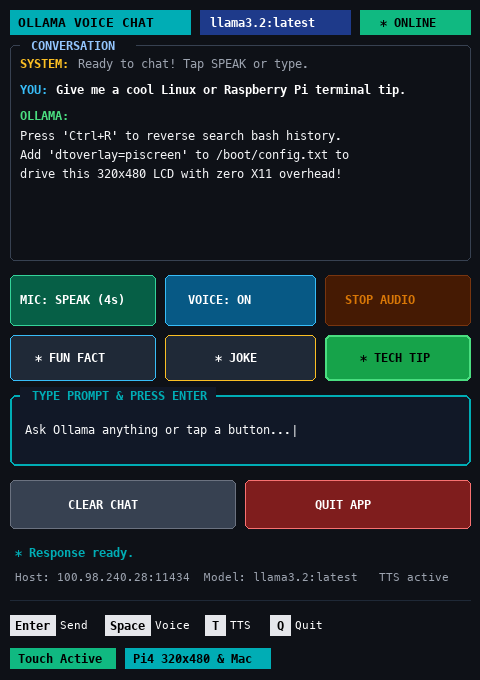
In one tap, the app queries Ollama and hands you a bite-sized piece of terminal wisdom, ready to read or listen to.
The Secret Sauce: Distributed Edge Intelligence over Tailscale
Running a 3-billion or 8-billion parameter LLM directly on a Raspberry Pi 4’s CPU is… an exercise in patience. You get maybe 1 to 2 tokens per second, while the Pi turns into a tiny frying pan.
We solved this with Tailscale:
- The Raspberry Pi 4 acts as the front-end communicator: handling the touchscreen, ALSA microphone recording, Whisper STT, and TTS audio playback. It sips only 2 to 3 Watts of power and stays cold to the touch.
- The LLM Engine runs on our workstation (
100.98.240.28:11434or local Mac M4) via Ollama with full GPU/Metal acceleration.
The Pi connects over Tailscale WireGuard in sub-millisecond latency. To the user holding the device, it feels like the 3.5-inch screen is running a frontier model natively in their hands!
# On your Raspberry Pi:
export OLLAMA_HOST="100.98.240.28:11434"
export OLLAMA_MODEL="llama3.2:latest"
./run_pi.sh
Quick Reference: Controls & Shortcuts
| Action | Touch / Mouse | Keyboard |
|---|---|---|
| Voice Input | Tap [ 🎤 SPEAK (4s) ] |
Space |
| Toggle Speech | Tap [ 🗣️ VOICE: ON/OFF ] |
T |
| Emergency Mute | Tap [ ⏹ STOP AUDIO ] |
S |
| Quick Joke | Tap [ 🧠 JOKE ] |
— |
| Quick Tech Tip | Tap [ 🚀 TECH TIP ] |
— |
| Clear History | Tap [ 🧹 CLEAR CHAT ] |
C |
| Submit Text | Tap Input Field & Enter | Enter |
| Quit App | Tap [ ✕ QUIT APP ] |
Q or Esc |
Why Build This?
In an era where software gets heavier, cloudier, and more intrusive by the week, building a self-contained, private, handheld voice appliance is an absolute breath of fresh air.
With just 300 lines of functional Coni code, a handful of POSIX commands (ffmpeg, arecord, say), local Whisper, and Ollama, you get a dedicated AI companion that:
- Doesn’t leak your voice data.
- Starts in 100 milliseconds.
- Fits in the palm of your hand.
- Lets you talk, tap, or type whenever inspiration strikes.
Grab a Raspberry Pi 4, plug in a 3.5-inch LCD, fire up Coni, and give Ollama a voice of its own!